October 22, 2010

How to add additional Google account in Android phones

This is strange. There is no direct method to add additional Google accounts (though they say up to 5 accounts can be added) in Android based phones. If you want to integrate, say both your personal and work Gmail IDs in the Android phone, there is no default method. In fact, there is one, but it does not work. When we try to add an additional account by touching 'Add account', it gives this error: "Can't establish a reliable data connection to the server". May be they will fix this in version. 2.2

Ok. Cant wait till that. Here is a simple work around to Fix this issue:

Create an account in Youtube with a Gmail ID you want to add to your phone. Do this from computer. That's easier.

Now, take your Android phone. Open Youtube app. Add this newly created ID.

Surprisingly, thats the end of the trick, hack, work around or whatever you call it.

That particular Google ID is automatically added to the 'accounts' list.

Now you can use it for Gmail, Calendar, Document, etc.

Simple.

April 6, 2009

SPONSOR POST: Toshiba Life - Make the most of your Toshiba Product

Toshiba Life is the all new website from Toshiba. Whether or not you own a Toshiba product, ToshibaLife gives everyone as place to learn more about the latest news, technology and exciting announcements from Toshiba.

Get involved and join in the Toshiba Life community, add your own comments and views. Thinking of buying a new laptop, video camera or DVD player? Toshiba Life gives you an insight into whats available, how to chose and what to look for. It's not just Toshiba products we discuss. Toshiba Life is all about helping you make the most from technology.

Take a look at Toshiba Life today.

September 21, 2007

How to add Emoticons in Gmail

I still don't understand why Gmail has no emoticon feature, still!! Gmail stands high among its peers in many ways. But Yahoo looks colorful for its set of emoticons and this particular feature grabs and retains many users. The more I thought of it, the more I wanted to search for any third party tools to power this feature into Gmail system.

I found an awesome tool to achieve this. A Greasemonkey script. Yes, as you would have guessed by now, it works only with Firefox. Never mind. Cheer up Firefox fans. One more reason to vote for our favorite browser!

Here is the screenshot of available emoticons:


There are two methods to add emoticons into the mail.

1. Drag and Drop.
2. Copy and Paste.

Both are easy methods. Self Explanatory.

Enjoy!!

Here is the script.

Update Firefox for better security

Our favorite browser Firefox has a new version 2.0.0.7 now. Even though it is a small update, it is very much advisable to update the browser for better security and stability.

Download Firefox 2.0.0.7

August 30, 2007

Are you annoyed with Adobe Acrobat Reader? Read PDFs with Foxit

foxitMost of us have installed Adobe Acrobat Reader to read PDF files. Just to READ. Nothing else. Rarely people use those additional features in Acrobat Reader. But for this simple reading requirement, we are forced to install such a huge software that which eats heavy memory.

Comparison on a 55 KB PDF file on a P4 system with 512 MB RAM:

comparison
You can see the huge Blue Bar that represents Adobe reader's Memory eating nature. If you just need to read a PDF, Foxit is best.

Foxit has many tools too but most of the users will not need all that. One notable feature is the ability to convert the PDF file into full Text file.

Download Link:

Foxit

August 28, 2007

iPhone hack no 2. This time, by a teen!

We had written about the iPhone hack last month. In one months time, the iPhone has been hacked for the second time. This time the hacker is a 17 year old teen. Welcome to the club mate!

Here is a full report by CBS News:

iPhone's Network Lock Hacked By Teen

Highlights of the hack:
  • The hack lets you use the iPhone with carriers other than AT & T.
  • That includes overseas operators too! Woww.. what a hack :)
  • The hacks needs both software and hardware skills. Means, soldering and software alterations.
  • The hacker has put the new version (!?) on ebay for sale. The bid was more than $2000 on friday.

Apple may introduce an invulnerable version when it introduces iPhone to European market.

August 24, 2007

Top 8 sites to waste your time

The most popular sites in the world are simply time wasters. Where there are millions of visitors, the site seems to be eating ones time. Let us list the top 8 time wasters.

8. StumbleUpon


If you are not sure what site to browse, SU is the place for you. Millions of pages indexed. You are sure to bump on one of it. Can customize categories. Can browse videos, images, autios and many more.

7. Myspace

Keep on browsing profiles. You will not realize that you have spent hours on it. The site doesn't need introduction. More often, people browse through profiles just to see photos. Such an useless time killer. Tell me honestly, how many users browse this site just to get connected to people? It is spoiling youth by letting people create obscene profiles.


6. Google Earth

If you start searching your home in google earth, you will not end up doing only that. Will start searching for all known placed in your area. The pleasure you get when you identify known places, it feels like magic. It feels like you are driving physically on the roads.

5. Miniclip

It has 1000s of games. Covers all categories. Fun is never ending. So do the Ads. Shit loads of ads all around! Just like a fish market All flash based mini games. Easy playing but yet so addictive.


4. Yahoo Games

If you are the one that likes to get challenged by human players, this is the place for you. Interactive games at its best. Pool game is so addictive. So realistic. I have played it all night, many nights. :)

3. Flickr

This is a photo supermarket. Millions of photos. Wide variety of cultures. People from all over the world have photos uploaded there. From all continents. Great photographs. The human nature of getting interested in what happens in next door makes this site one of the most visited.

2. Youtube

Addiction at its peak. It is like drug. Can find anything in video format there in Youtube. Again, one can spend hours and hours in youtube. I was seeing Mr Bean clips for 6 hours non stop! Piracy is freely supported in Youtube. They dont seem to worry about this growing problem. 70% of the videos uploaded here are pirated. They simply dont want to stop it. Can anyone deny it?

1. Orkut

The king of useless sites. Orkut is becoming the most popular and dangerous site in the world. People are becoming addicts to Orkut. The main reason why Orkut is the most popular dating site (though the creators don't like it to be called a dating site, it IS, OF COURSE a dating site) is that it is kept FREE till date. Unlike other dating sites, there is no premium membership. Lots and lots of complaints are being made against Orkut. Particularly from India. The creators have to do something to stop Orkut being misused.

August 23, 2007

Dekhona, An Indian attempt to mock Youtube

The immense popularity of youtube is tempting many entrepreneurs to mock (i dont want to use the word 'copy' here) it. We have seen various small video sharing sites popping up regularly.

Dekhona is one such thing but targeted for India. Indian clips are uploaded. Or at least that is what the creators thought would happen. When I browsed through the videos, I could see many non-indian videos that are available anywhere else. So the purpose is not served, as far as I am concerned.

Most of the clips are adult oriented. The admin team needs to work around to bring in many more visitors and uploaders of all ages. They need to control the videos that are featured in the home page.

The site is totally free.

Technorati tags: dekhona

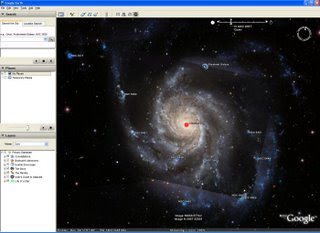
Google Earth offers Sky now. Explore the Sky from your Bedroom!

google earthThe super hit product of Google, Google Earth is now presenting a live view of the Sky.

Now exploring universe is simple and easy from the comfort of our home. Millions of galaxies are waiting to be explored and discovered.

These are the possibilities:

1. Zoom
2. Explore
3. See the planet in motion
4. Mark the space
5. Possibilities are endless.

Technical Aspect:

You need to download the latest version of Google Earth. Click on the new Sky button on the toolbar at the top of the screen, and navigate the skies!

Here is the official post: Sky: The final frontier

Some official examples: Google Earth Gallery


Technorati Tags: Google Earth, Sky

August 7, 2007

Play Station 3 with massive 80GB Storage is out in market

Market leader in the Gaming Console industry Sony has started to ship its new version of Play Station 3. The news: It has 80GB storage!!

It comes with an online playable off-road racing game, MotorStorm.

The price is set to $499 in US.

The 80GB model joins the existing 60GB PS3 that has been available at retail since its launch last November.


Technorati Tags: Playstation

August 6, 2007

New form of Image verification is coming soon

HIPImage verification process is not new to netters. The irritating, ugly distorted texts may be history soon. Microsoft is researching on the Image verification technology (also called 'Human Interactive Proofs'). The problem with the existing technology is that, it is getting old and hackers are starting to tweak their codes to fool the HIPs.

So, how the future HIP may look? May be like this:

catYes, you may be asked to identify the object. Cats and dogs will be appearing in online registration forms soon.

Again, hackers may soon find a way to by-pass this kitten technique (!?!) if the system doesn't have enough number of images to rotate (may be a million)

The research is not going to end there. They may be showing us small video clips as HIP!

Source: Kittens Could Solve Spam


July 26, 2007

Online Backup - These two tools make a great combination.

The traditional custom of believing Hard Disk for storing important files has been proved insecure. The habit of storing files online has grown drastically from the last 2, 3 years. There are tons of sites and tools available for this task. Choosing a best site is a tricky job.

The first thing that come in our mind is the reliability of the site we use. After testing many sites and tools all these years, we at TechnoPark, are using two tools constantly. Let us explain it.

1. GDrive.

This is a shell extension for windows. This tool helps us use the massive storage offered by GMail. We have earlier reported about this tool. Read here:

How to use Gmail space as Hard Disk Space

For practical usage, it is awesome. It is smooth and seamless. Works like an angel.

2. DriveHQ

DriveHQ.com is a great service for online storage. It offers 1 GB free space for every user. That is more than enough for many real time users. Registration is free. What makes this service worth is the File Manager tool they offer for free. It is an amazing tool. Everything about the tool is so good. Take a look at the screenshots:

click to enlarge

click to enlarge

Both these tools are added in the context menu of Windows. It makes life easier. Just a right click. That is all you need to do. You will have a backup seamlessly in two reliable, online services.

Download links:

GMail Drive Shell Extension

DriveHQ

Technorati Tags: Gmail Drive, Gmail, DriveHQ, Online Backup


July 24, 2007

The inevitable happened. iPhone Hacked.

iphoneNew York Times has reported that a team of computer experts have hacked iPhone. The experts say they could hack the iPhone in 2 ways.

1. Through a WiFi connection
2. By tricking the users to visit a site with malicious code in it.

They say, once the hole is found, they were able to have total control over the phone.

The hack, the first reported, allowed them to tap the wealth of personal information the phones contain.

New York Times adds:

Dr. Miller, a former employee of the National Security Agency who has a doctorate in computer science, demonstrated the hack to a reporter by using his iPhone’s Web browser to visit a Web site of his own design.

Once he was there, the site injected a bit of code into the iPhone that then took over the phone. The phone promptly followed instructions to transmit a set of files to the attacking computer that included recent text messages — including one that had been sent to the reporter’s cellphone moments before — as well as telephone contacts and e-mail addresses.


This is the first of many many more iPhone hack to be followed!!

Technorati Tags: iPhone

July 23, 2007

Whats new in Opera new version? Review

Good news. Opera has released a new version 9.22. When Firefox new version was released last week, many predicted that Opera will come up with much awaited new version.

What are all has been modified?

User Interface

  • Fix to allow toolbars to use bold fonts again.
  • Tabs can be dragged between windows using the Windows panel again.
  • Info panel title now correctly displays Web page title and mail subjects that contain HTML.

Miscellaneous

  • Scripting and display fixes for the Silverlight plug-in.
  • Multiple stability fixes.
  • Improved stability and performance of BitTorrent.

Security

  • Fixed an issue that could occur when removing a specially prepared torrent transfer, as reported by iDefense. See the advisory.
  • Prevented an issue where data URLs could be used to display the wrong address in the address bar. See the advisory.
  • Improved the display of long domain names in authentication dialogs. Long domain names will now scroll instead of using ellipsis. See the advisory.
  • Added Trustcenter class 3 G2 root certificate.

Windows specific

  • Fix for accessing certain Web sites using Windows Vista.

July 19, 2007

Zoom images with this addon in Firefox


One of the very useful feature of Opera browser is the ability Zoom in and Zoom out images and pages. Just the press of '+' and '-' keys will Zoom in and Zoom out. Firefox lacks this feature by default. The 'Image Zoom 0.3' addon does exactly that. Zoom in, Zoom out, Fit image to screen, etc. Very handy.

Here is the download:

Image Zoom 0.3

Page Zoom - Zoom all images on a web page with a single command or make all images on a page zoom with the browsers text zoom feature .

July 16, 2007

How to download multiple files with one click for dummies

This is probably a well known task for the real techy geeks. This tutorial is aimed at Newbies that want to download a series of 'pictures' (in most cases) in one single click.

I am going to tell you guys how to download multiple files with my favorite download manager - Flashget. It is the fastest download manager as far as i know. Very easy to use.

Download Instructions

Flashget Latest Version or Flashget Classic Version

Install whichever version you like.

Steps to download batch files:

Step 1:

Find out the server address where the images are located. I take this for example:

http://www.dinakaran.com/kungumam/2007/july/12/[image name here]

Step 2:

Make sure that the images are named in some order. Say, 1.jpg, 2.jpg, like that or usa10.jpg, usa11.jpg etc.

Step 3:

Open Flashget. Click on 'Jobs' and select 'Add batch download'

flashgetStep 4:

Add URL like the following format:

URL http://www.dinakaran.com/kungumam/2007/july/12/(*).jpg

flashgetIn the 'from' box, there are two options. One for numeric and another for alphabets. If the image names (of any file type) have numbers, type the starting number and ending number in the column. EX: 1 and 40 means, img1.jpg, img2.jpg.... img40.jpg.

Just click OK.

Step 5:

Select destination folder. Thats all. It will start downloading all the files one after another.


July 12, 2007

High Alert!! - New PayPal Scam. A fraudulent mail, claims to be from PayPal. GMail can't find it.

I am stunned this morning when I opened my GMail. There is a mail from 'service@paypal.com'. The subject line reads 'Paypal Account Security Measures'.

Normally, GMail will alert us when there is a fraudulent mail that claims to be from Paypal. This time, this new scam beats GMail too. The mail looks absolutely stunning. Here is the screenshot:

paypalclick to enlarge

When I click the link, it took me to a paypay look-a-like site. It was my mistake not to watch out for the URL in the address. The trap has been very well planned not to trigger any doubt on the users. This is how the screen looked:

paypalclick to enlarge

The home page of 'http://www.news-play.com/' greets us with joomla open source softwares. Here is the screenshot of the homepage of the site:

paypalclick to enlarge


I entered the user ID and password of my Paypal account. And within seconds, I realized that I was trapped. I immediately logged in to the PayPal site and changed the password.

How I could find the trap?

1. I always use Firefox for secured sites. The NoScript plugin showed me 'blocked' symbol. Normally, for paypal.com it shows 'scrips open' icon, as I have already opened Scripts for paypal site.

2. The site advisor showed 'gray' which means site 'not rated'. It will obviously show 'green' for paypal as it is a well known site.

These two great tools helped me realize.

I have reported to the Gmail team and to the PhishTank team. Hope the site gets banned soon.

Please help us spread this alert to everyone. Please digg it, reddit or share it wherever you can.

Digg it.

Thanks.


July 11, 2007

iPhone specific Digg Beta is ready.

iphone-diggDigg founder Kevin Rose has announced that Digg is available for iPhone. In his blog, he writes:
"Last weekend Joe Stump, Daniel Burka, and I sat down and white-boarded the Digg iPhone app. I told Joe if he coded it in 48hrs, I’d buy him an iPhone. Needless to say, he got it done (nice work, Joe)"
Point your Safari browser in iPhone to digg.com/iphone

These are some of the features currently available:

* Native iPhone-like story scrolling
* Mini permalink pages with top 5 comments
* Login and Digging
* Pagination
* Jump to any topic

Features Coming:

* Top Stories (24 hours/7 days)

The thing one must understand is that the normal Digg.com site can be accessed from iPhone without any hassle. But this special version is lite and easy to use with iPhone.

July 4, 2007

Feedburner is free now.

When Google acquired Feedburner a few months back, most of the marketing pundits wrote that google would make Feedburner free. And it has happened at last.

Feedburner is totally free now. To be more precise, two things have been made free. Stats Pro and MyBrand.

This is what their blog has to say about those two things:

1. Stats Pro

PRO is feed analytics taken to the next level. You will now have access to the number of people who have viewed or clicked individual content items in your feed and “Reach,” which estimates the daily number of subscribers who interacted with your feed content. You can turn this on by signing in to your account, navigating to the Analyze tab and heading to the FeedBurner Stats PRO section. Click the “Item Views” checkbox to activate these PRO features.

2. MyBrand

The MyBrand service (also PRO-level) is located under the "My Account" tab after you've signed in. MyBrand lets you maintain consistency between your feed address and your hosted website's domain, if matchy-matchy is your thing. For example, rather than using feeds.feedburner.com/MyFeedName, your MyBrand-ed feed address can be feeds.myexcellentdomain.net/MyFeedName. To get started with MyBrand, sign into FeedBurner, click the "My Account" link in the upper left-hand corner, and then click "MyBrand". Nota Bene: You must be comfortable playing around with DNS entries and own the rights to the domain whose DNS entries you'll be playing around with in order to successfully activate MyBrand.

The Stats Pro is a very good tool and most of the bloggers will feel happy to see it available for free. The MyBrand stuff is a little tricky. I personally would like to keep my feed address in the Feedburner domain itself. It looks grand and rich than an address like feeds.yoursite.com/feed.

July 2, 2007

How to search original science videos? Use ScienceHack

sciencehack
ScienceHack is a new search engine dedicated to science videos. It is still in alpha phase. But it is out for general public.

What makes this search engine unique?

Every video is screened by a scientist or an engineer to verify the video's accuracy and quality. Well, a huge problem with mainstream videos like YouTube, Google videos or Yahoo videos is that the videos are not authenticated.

What ScienceHack actually does is, it aggregates videos from other video sites and get it verified by the experts. This way, the authenticity of the video is somewhat fulfilled. But still, I would have been happier if they provide information about the expert who verified the video. So that we can communicate with him for further clarification.

Some of the interesting videos i liked:

A full-scale earthquake experiment

The Size Of Planets and Stars to Scale

Chill A Drink In 2 Minutes!

Users can submit videos they find interesting and scientific. Currently they have not indexed much videos.

Over all, this search engine has the potential to become the preferred spot for science enthusiasts.


ScienceHack


Technorati Tags: ScienceHack